Have you ever tried to squeeze a little extra juice out of a Performance Max campaign, only to watch the algorithm run wild and burn through your budget in a matter of days?
That's exactly what happened to my client, Santos. He runs paid media in-house for a large, international business in a sensitive interest category (think finance, healthcare, education, that kind of thing).
[P.S. If you haven't bought your ticket yet for Inside Google Ads Live in Toronto on October 29th, this is your last chance!]
Santos wanted to capture some short-term lead volume for his business in early September, so he temporarily removed his Target CPA and bumped his daily budget up to $280.
He expected proportional spend and lead growth. Instead, the campaign went on a spending spree, hitting a served cost of $542 just two days later - and no increase in conversions to match.
When we jumped on our Google Ads coaching call in late September, I saw exactly what went wrong...
This issue of The Insider is sponsored by Optmyzr
Optmyzr's MCP just landed in Claude's official MCP Directory. It's gotten sharper lately, too — it can now create and apply new keywords for you right in the chat (with your sign-off before anything goes live), and LinkedIn Ads data just joined Google, Microsoft, and Meta in the mix.
(affiliate link)
Before Santos "big change," the PMax campaign had been underspending; about $100/day on a $230/day budget. Because of how budgets work in Google Ads, this Performance Max campaign was building up a surplus. It wasn't spending the full budget because it was restricted by the CPA target.
If Santos had only removed the CPA target, the campaign would have exploded in spend without the budget increase. Remember, Maximize Conversions tries to spend the budget in full, and then think about conversions; Target CPA tries to hit your desired efficiency first, and then only spend the budget if it can maintain that efficiency.
Because the bid strategy change coincided with a $50/day budget increase as well - on a campaign that had been chronically underspending - it got so excited trying to fulfill its Maximize Conversions mission that it captured every possible Search, then expanded into Display and Gmail because hey, that's what Santos told it to do!
Here's a snapshot of this PMax campaign's channel performance through this period:
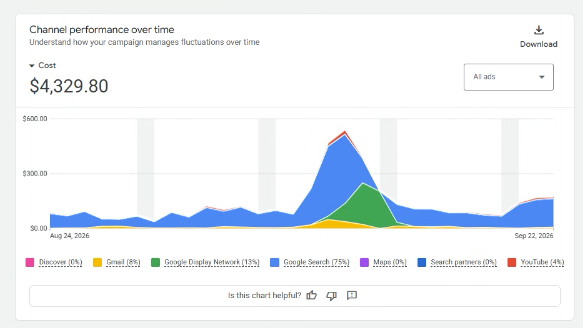
Although Santos didn't understand why PMax went crazy (until our call), he knew how to fix it: put the Target CPA back in place, and reduce the budget. As you can see from the chart, that did the trick!
Here's what to think about before you scale your Performance Max budget:
- Check your actual daily run-rate: Look at what your campaign is actually spending on average over the last week (like Santos's baseline of around $100 a day), not just what your daily budget is set to. You may need a bid strategy change rather than a budget increase in order to scale spend.
- Implement a Target before you scale: In general, I recommend using Target CPA or Target ROAS bidding before a budget increase, so that your campaign only spends that budget if it thinks it will achieve your goals. (There may be exceptions during unusual periods, like holiday sales, where you want to force more spend through - so consider this "steady state" advice)
- Keep a close eye on channel performance over time: This is a relatively new view in your PMax insights, and it's helpful to look at the Cost over time and Impressions over time to understand what your Performance Max campaign is actually doing. Remember, PMax is not a black box, it's a clear box!
Let's get your campaigns performing at their best. Book your Google Ads coaching call with me.

P.S. If you're in the Toronto area, you've gotta join me for Inside Google Ads Live at the CN Tower on October 29, 2026!
Learn more and get tickets now